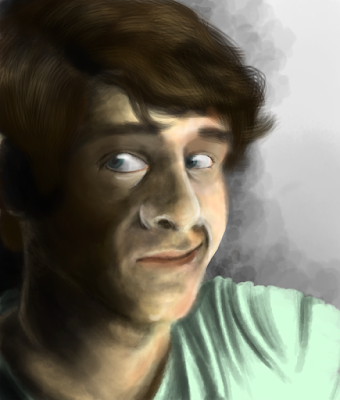
 Self-portrait for preliminary critique. I mostly used warm tone (mostly different shades and different opacities of brown color).
Showing posts with label self portrait. Show all posts
Showing posts with label self portrait. Show all posts
Wednesday, February 9, 2011
Self-Portrait of me
Self-portrait for preliminary critique. I mostly used warm tone (mostly different shades and different opacities of brown color).

Tuesday, February 8, 2011


Preliminary Crit Portrait

This is my portrait for my preliminary crit. I'm supposed to discuss using the color layer effect and another topic I can't remember at the moment.
Thursday, January 27, 2011

Wednesday, January 26, 2011


self portrait

This is my self portrait that took forever to load. I used the brushes we made in our earlier assignment.

Trisha Cleveland portrait
Self portrait using three different custom brushes.

Brushes used:

1st: A general sketching brush I use often.
2nd: Dots, used for freckles and hair.
3rd: Grungy texture brush. (not used here)
4th: Soft texture brush, used to smooth skin.

Brushes used:

1st: A general sketching brush I use often.
2nd: Dots, used for freckles and hair.
3rd: Grungy texture brush. (not used here)
4th: Soft texture brush, used to smooth skin.


Self Portrait

This was my first attempt at a portrait, I used a picture for reference in order to get the proportions between the eyes, nose and mouth correct. I was in a fairly lit in the picture so there is only a little shadowing. I took free handed the hair style using one of the brushes we created in the previous assignment. I was able to get a good blending of colors by putting them on separate layers, and then messing with the opacity. I love how it turned out!
selfportrait1
 this is my self portrait, i used one of the brushes another person in my group did for the skin and i used my leaf brush for the hair/eyebrows
First Self Portrait
This was my first attempt at making a self portrait inside of photoshop. The room I was in was completely dark except for two computer monitors and a little hallway light coming in from behind. I used the two brushes that I had made along with Catherine's cat fur brush.
self portrait, illustrative style
 ^^ Here is my first self portrait image. I started with a sketch and then outlined it, as you can see below. The outline had a nice illustration/cartoon pen and ink quality, so I decided to run with it. I tried to make the shading mimic an ink wash, using the bleedy-watercolory brush that I created for our first assignment. I think the jpeg compression killed the effect a little bit, but the printout looks better.
The image below is my first attempt that I created over the weekend. As you can clearly see, it looks nothing like me. As I was drawing, I was increasingly distressed by the non-resemblance (and I was indeed drawing from a mirror), so I ended up with this picture of a random worried-looking girl. However, I'm somewhat happy with the chalk pastel effect that I got with my homemade brush, so I decided to share it:

Self Portrait

This is my final iteration of my first attempt at my self portrait.
I made it by laying down blocks of color using my grunge-y brush, then using the Gaussian blur function to blend them all together. I repeated this a few times until i started to get a good shape. Then I used the smudge brush with my hairball paintbrush to make my portrait look 'painterly' and shape it a bit more.
Subscribe to:
Posts (Atom)